 Pocket Piggy
Why the paper chart on the fridge stops working
A paper chore chart is a great idea for about two weeks. Then the marker dries out, someone forgets whose turn it was to take out the trash, and the chart becomes something everyone walks past. The idea was right: kids do better when they can see what is expected of them. The paper just can't keep up with a real family week.
Pocket Piggy keeps the good part, one place where everyone can see the plan, and takes over the bookkeeping. It remembers whose turn it is, it hands turns on each week or month, and it keeps a record of what actually got done.
How it works
- Add your family. Each kid gets their own spot on the board. Grown-ups can be added too, so the chores you do show up alongside everyone else's.
- Add chores. Pick who does each one and how often it comes around: every day, on the weekdays you pick, every other week, monthly or just once.
- Kids check them off. When a chore is done, your kid taps it.
- You approve. A quick look, a tap, and it counts. Nothing is final until a parent says so.
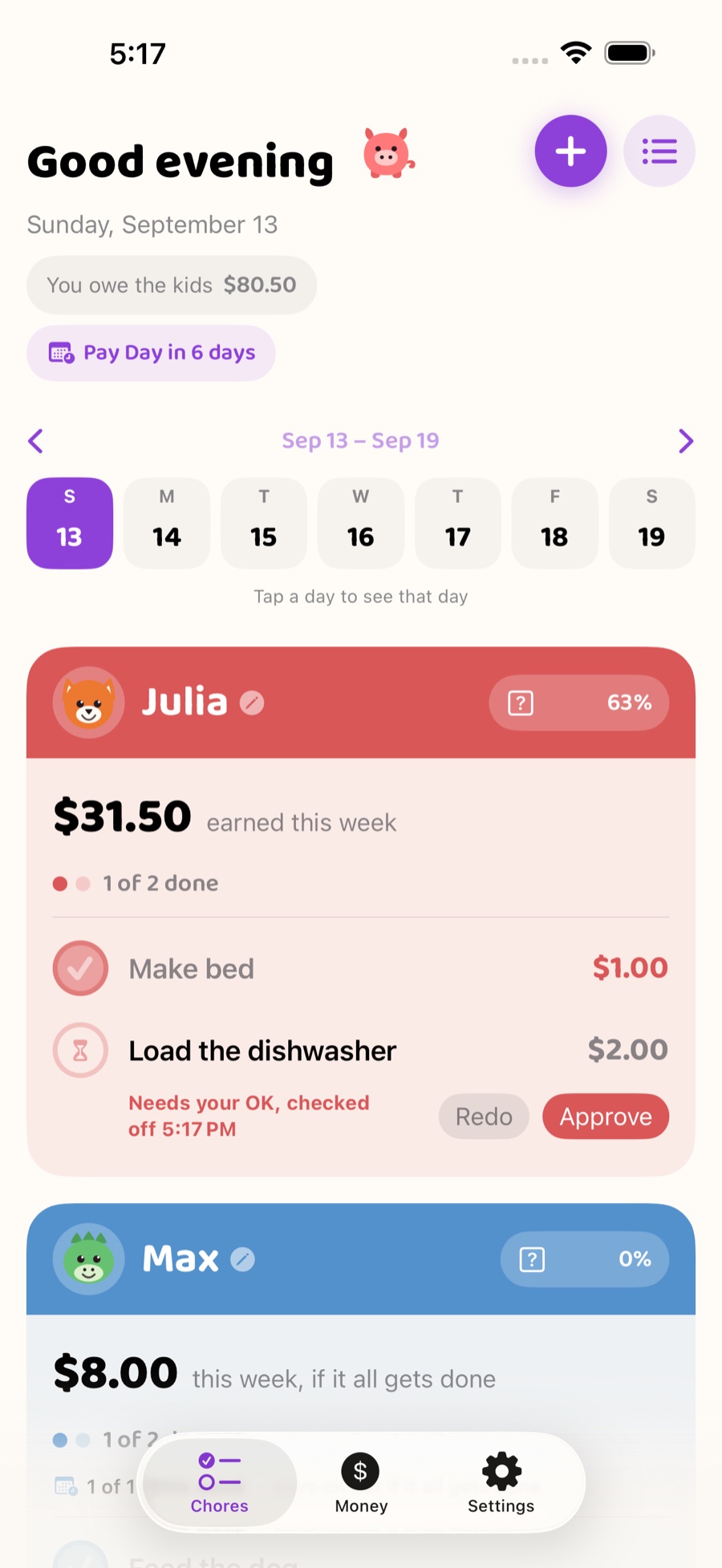
Parent approval keeps it honest
Checking something off is the kid's job. Approving it is yours. That small step matters more than it sounds. It gives you a moment to say "nice work on the dishes" or "let's have another go at that bedroom", and it means the chart reflects what really happened. Kids learn quickly that a tick on the board means the job is actually done.
Chores that take turns
Rotating chores are where most charts fall apart, so Pocket Piggy handles them for you. A chore can belong to one person, or be shared in one of two ways:
- Take turns. The chore rotates between the people you pick. Trash can go to one kid this week and the next kid the week after, without anyone keeping track.
- Up for grabs. Any kid can take it. Once one kid checks it off, it disappears from the others' lists for that day.
Grown-ups can be part of a rotation too. If mowing the lawn is shared between a parent and a teenager each month, put them both on it and let it hand off on its own.
Up-for-grabs chores for extra effort
Some jobs don't belong to anyone in particular: washing the car, sorting the garage, raking leaves. Put them up for grabs and any kid who wants to can pick one up. It's a simple way to reward the kid who asks "is there anything else I can do?" and it keeps extra jobs from turning into an argument about fairness.
Built for kids who aren't reading yet
In Kid Mode, each kid taps their own picture to see their chores. For pre-readers, speaker buttons read the screen and each chore aloud, so a four-year-old can find "feed the cat" without asking for help. Kid Mode is locked with a 4-digit PIN you choose, so you can hand over your iPhone or iPad without worrying about settings being changed.
On every screen in the house
Pocket Piggy runs on iPhone, iPad and Apple TV, and keeps everything in step through iCloud. Put the board on the living room TV so the whole family can see the week, add a widget to your home screen so today's chores are a glance away, and check things off on iPhone or iPad. If you still love paper, you can print a monthly chore chart for the fridge as well. Want a paper chart today? Grab a free printable chore chart for your kid's age, or make your own with the chore chart maker.
Read more about the family chore board on Apple TV.
Chores and allowance, if you want them together
You can use Pocket Piggy purely as a chore chart. Many families also attach an amount to chores, so approved chores add up toward Pay Day. If that's you, see how the allowance side of Pocket Piggy works, including an automatic split into spend, save and give.
Tips for getting started tonight
- Start small. Two or three chores per kid is plenty for the first week. You can always add more once the habit sticks.
- Pick chores kids can finish on their own. "Put your shoes on the rack" is easier to check off than "keep the hallway tidy".
- Approve at the same time each day. After dinner works well. Kids learn when to expect it.
- Make the board visible. A widget on your phone, the Apple TV in the living room, or a printed chart on the fridge.
What it costs
Pocket Piggy is free for one kid, with every chore feature included. When you're ready to add more kids or share the family with another grown-up on their own devices, a one-time $9.99 Family Unlock covers the whole family. There's no subscription at any tier. Here's how pricing works.