 Pocket Piggy
The problem with allowance
Allowance is supposed to teach kids about money. In practice it often teaches them that grown-ups forget. The cash isn't in your wallet, nobody remembers whether last week was paid, and a kid's savings live in a jar that gets raided for ice cream. Pocket Piggy gives every kid a clear, shared record of what they've earned and where it went, so the lesson is about money instead of about who remembered.
A ledger, not a bank
Pocket Piggy doesn't hold money and doesn't connect to a bank account or card. It's a record the whole family agrees on. You decide how kids actually get paid: cash, a transfer, or keeping a balance in the app until they want to spend it. That keeps setup simple. There's nothing to link, and no card to lose.
Spend, save and give, split automatically
Every dollar a kid earns can be split three ways the moment it lands:
- Spend is theirs to enjoy.
- Save is for something bigger, later.
- Give is for someone else.
You set the split once for each kid, and Pocket Piggy does the maths every time. Kids can see all three balances, which makes conversations like "can I afford this?" much easier. The answer is right there in their spend balance.
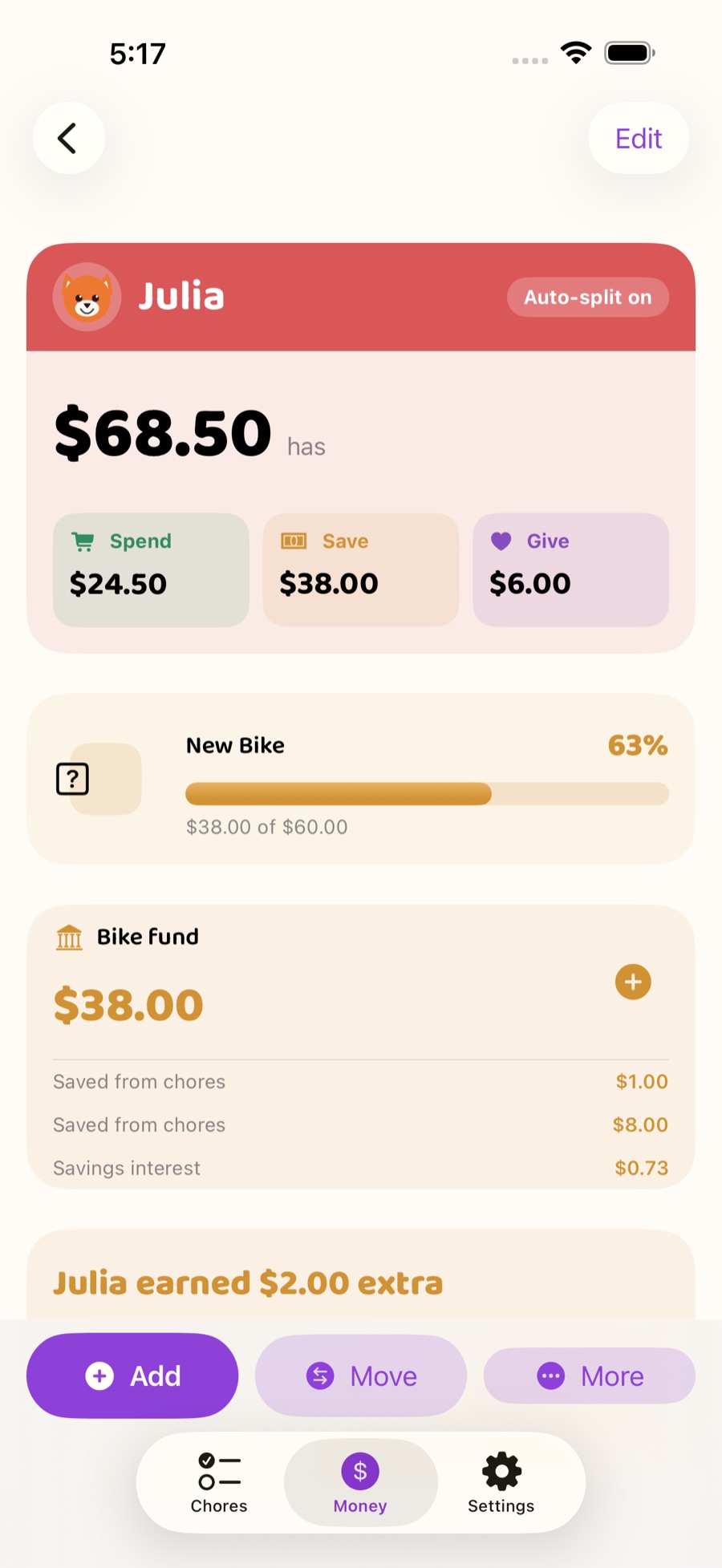
Savings interest, paid by you
A good way to show a kid why saving matters is to reward it. Pocket Piggy lets you pay interest on what's in a kid's save balance. The interest comes from you, the parent, as a reward for leaving money alone. Watching savings grow is a small moment that can make the idea of compound growth click years before school gets to it.
Recurring allowance
Not every family ties money to chores. If you give a set allowance, add it once as a recurring allowance and Pocket Piggy adds it for you on schedule. Some families combine the two: a small base allowance plus extra for chores. Pocket Piggy handles both. Not sure how much to give? Try the allowance calculator.
Chores that pay
If you'd like chores to earn money, give a chore an amount. When your kid checks it off and you approve it, it counts toward their earnings. Put extra chores up for grabs for kids who want to earn a bit more. The chore chart and the allowance are the same app, so there's nothing to copy from one place to another.
Pay Day
Pick a day for Pay Day. Through the week, approved chores add up, and everyone can see Pay Day coming. When it arrives, the money lands in each kid's balances with a celebration. It gives the week a rhythm, and it gives kids a reason to finish their chores before the deadline instead of after it.
Seeing it together
Everyone in the family can see the same numbers. Parents on their iPhones, kids in Kid Mode on a shared iPad, and the whole family on the Apple TV board. In Kid Mode, locked with a PIN you choose, each kid taps their picture to see their own chores and money, and speaker buttons read things aloud for kids who aren't reading yet. Home screen widgets keep things in view without opening the app.
Money conversations worth having
A few ideas parents use with Pocket Piggy:
- Let them choose. When a kid wants something, look at the spend balance together and let them decide whether it's worth it.
- Make giving concrete. Let kids pick where their give balance goes, whether that's a charity, a friend's birthday present or a family cause.
- Talk about interest. Point out the interest your kid earned this month and ask what would happen if they left their savings alone for a year.
- Keep the split steady. Changing the split every week makes the lesson harder to follow. Pick one and stick with it for a while.
What it costs
Every allowance feature is free for one kid. A one-time $9.99 Family Unlock adds as many kids as you like and lets you share the family with another grown-up on their own Apple Account. No subscription. See how pricing works.